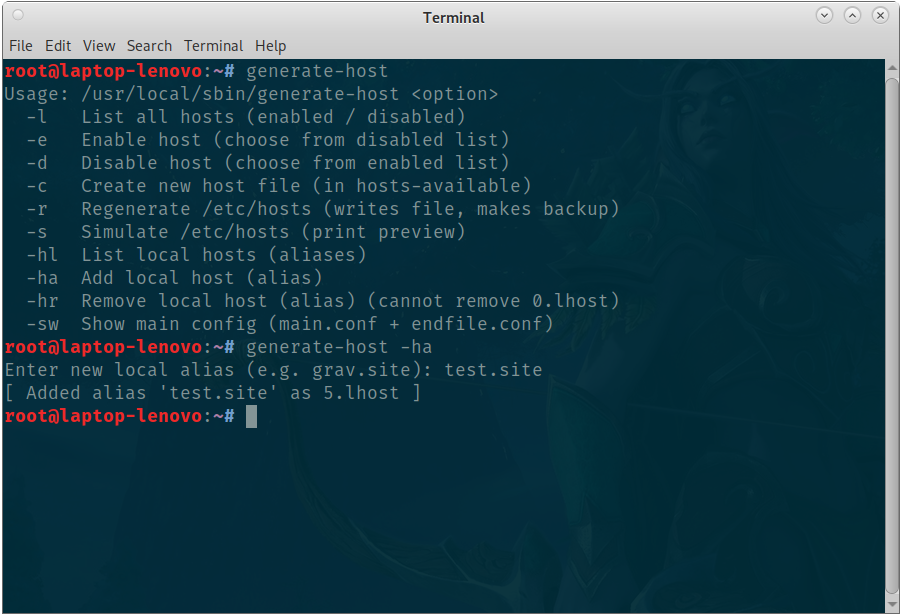
What this does
generator-hosts.sh helps you manage '/etc/hosts' entries by keeping individual host definitions in an hosts-available/ directory and enabling them by creating symlinks in hosts-enabled/.
The script can regenerate /etc/hosts from enabled entries, keeps automatic backups, and supports a small set of "local aliases" (a simple list of alternate names that are added to the 127.0.0.1 line).
Quick start / prerequisites
- Tested on systems with Bash (script uses Bash features like arrays and shopt).
- You must run as root (the script writes /etc/hosts).
- Place the script and supporting folders under a single root, the default is:
/opt/hosts_config/ - Make the script executable:
sudo chmod +x /opt/hosts_config/generator-hosts.sh
sudo ln -s /opt/hosts_config/generator-hosts.sh /usr/local/sbin/generator-hosts
sudo generator-hosts -l
How it works — concepts
- Hosts available: Single-file .conf entries stored in hosts-available/. Each file typically contains a line like:
192.168.1.10 example.local example.com - Hosts enabled: Enabling a host creates a symlink in hosts-enabled/ pointing to the available file. The regeneration reads enabled files in order and appends their contents to /etc/hosts.
- Local aliases: Files *.lhost inside localhost-aliases/ are read; the first line of each file is appended as a name to the 127.0.0.1 line (so you can add myapp.local, app.test, etc.). 0.lhost is used for the base localhost entry and the script prevents removing 0.lhost.
- Main and end files: Optional main.conf (inserted after the 127.0.0.1 line) and endfile.conf (appended at the end) live in hosts-main/.
- Backups: Before writing /etc/hosts the script copies the current /etc/hosts to backups/hosts.bkp.TIMESTAMP.
Script usage & examples
Run the script with one of the supported options (example path adjusted to where the script lives):
# List enabled / disabled hosts
sudo generator-hosts -l

# Enable a host (interactive index selection)
sudo generator-hosts -e

# Disable a host (interactive index selection)
sudo generator-hosts -d

# Create a new host file interactively
sudo generator-hosts -c

# Regenerate /etc/hosts (writes file and creates backups)
sudo generator-hosts -r

# Print a simulation / preview of what would be written
sudo generator-hosts -s

# List local aliases
sudo generator-hosts -hl

# Add a local alias
sudo generator-hosts -ha

# Remove a local alias (cannot remove 0.lhost)
sudo generator-hosts -hr

# Show main.conf and endfile.conf
sudo generator-hosts -sw
Non-interactive / scripting notes
The script is primarily interactive (it reads user input when enabling/disabling or creating entries). If you plan to script interactions, consider calling the underlying file operations yourself (for example creating .conf files in hosts-available/ and symlinking into hosts-enabled/), then call the -r option to regenerate /etc/hosts.
Creating a host file (format)
Each host file in hosts-available/ is a simple textual .conf file. The script writes files created with the -c option in the following single-line format:
IP | space | space-separated-domains
Examples:
192.168.1.10    myapp.local myapp.example.com
127.0.0.1    local.test another.local
The script will use the filename (without .conf) as a fallback name if no domains were added during interactive creation.
Local aliases
Place small .lhost files inside localhost-aliases/. The script reads the first line of each file and appends those names to the 127.0.0.1 hosts entry.
Example:
# file: localhost-aliases/1.lhost
myproject.local
When regenerating, the first (base) line for loopback becomes:
127.0.0.1 localhost myproject.local anotheralias
The script prevents deleting 0.lhost (index 0) via the remove operation because that file is treated as the system localhost line.
Regenerating /etc/hosts & backups
-r or regenerate_hosts will:
- Build a temporary hosts file from
127.0.0.1 line + hosts-main/main.conf(if present) + enabled hosts + hosts-main/endfile.conf. - Copy the current /etc/hosts into backups/hosts.bkp.###TIMESTAMP.
- Move the generated temporary file to /etc/hosts and set chmod 644.
Backups are stored in the backups/ directory under the configured ROOTFOLD.
Implementation notes & internals
- The script uses arrays and shopt -s nullglob for safe globbing.
- refresh_arrays() re-populates all arrays used by the interactive commands (available/enabled/aliases).
- The create_host() function validates filename characters and IP string presence but does not validate IP syntax strictly — if you want strict validation you may add an IP regex check or use ipcalc.
- Host enable/disable operations are implemented by creating and removing symlinks inside hosts-enabled/.
Troubleshooting
- /etc/hosts not updated: Ensure you run the script as root. Check that backups exist under backups/ and inspect the temporary file created by _build_hosts_file using the -s (simulate) option.
- Host file not applied: Check the enabled symlink exists in hosts-enabled/ and points to the correct hosts-available/###NAME.conf file.
- Aliases not appearing: Ensure each .lhost file contains the alias on the first line. Run -s to preview results.
- Permissions: /etc/hosts is set to 644 after writing; adjust if your environment requires different permissions.
Contributing
If you want to add features or fix bugs:
- Fork the repository (or copy the folder).
- Make changes and test carefully the script writes system hosts so test in a safe environment or VM.
- Send pull requests or patches with a clear description of the change.
Suggested improvements:
- Add strict IP validation when creating host files.
- Add a non-interactive mode for bulk enabling/disabling.
- Add an option to preview diffs between current /etc/hosts and the generated file prior to writing.
License
This README and the accompanying generator-hosts.sh are provided under the MIT license.